Looking for an affordable smart TV that gives you streaming, Alexa voice control, and a straightforward setup?

Quick verdict
You’ll find the “Amazon Fire TV 40″ 2-Series, HD smart TV with Fire TV Alexa Voice Remote, stream live TV without cable” to be a solid budget option if you want smart features and decent picture quality without spending a lot. It’s aimed at people who want a simple, familiar Fire TV experience, solid app support, and Alexa voice control in an easy-to-use package.
What this review covers
You’ll get an honest look at picture quality, sound, smart features, remote and voice control, connectivity, gaming, and real-world performance. Each section will give practical impressions so you can decide if this model fits your living room, bedroom, dorm, or secondary TV needs.
Key specifications
These are the features you’ll care about at a glance, summarized so you can compare quickly. The list below pulls together what matters for picture, sound, smart functionality, and inputs.
| Feature | Details |
|---|---|
| Model | “Amazon Fire TV 40” 2-Series, HD smart TV with Fire TV Alexa Voice Remote |
| Resolution | Full HD 1080p |
| HDR Support | HDR10, HLG |
| Audio | Dolby Digital Audio support |
| Smart Platform | Fire TV (access to apps, skills, Alexa) |
| Voice Remote | Fire TV Alexa Voice Remote (voice search, control) |
| HDMI | 2 standard HDMI inputs, 1 HDMI ARC |
| Wireless | Bluetooth for headphones and accessories |
| Streaming | Netflix, Prime Video, Disney+, YouTube, Tubi, Pluto TV, etc. |
| Gaming | Apps via Appstore, Amazon Luna, Twitch |
| Sync | Keep content in sync across Fire TV devices |


Design and build quality
The 40″ 2-Series keeps things simple and unobtrusive so it fits into most rooms without drawing attention. You’ll notice a basic plastic bezel and straightforward stand that’s functional rather than flashy, which helps keep the price accessible.
Materials and finish
The casing is lightweight plastic, designed to be practical for wall-mounting or tabletop placement, and it won’t feel premium but it won’t be fragile either. You’ll appreciate the minimal aesthetic if you prefer electronics that blend into the background.
Mounting and footprint
You can put this TV on a tabletop using the included legs or mount it on the wall using a standard VESA mount, and the compact footprint makes it a good fit for smaller living areas. This versatility means you can use the TV as a main screen in a studio or as a secondary screen in a living room or bedroom.
Display and picture performance
The Amazon Fire TV 40″ 2-Series’s 1080p panel delivers clear, sharp images for its class, and HDR compatibility adds improved brightness and color range in supported content. If you’re upgrading from an older 720p set or using this as a bedroom or kitchen TV, you’ll notice a meaningful step up.
Color accuracy and vibrance
Colors are generally pleasing and tuned for everyday viewing, with decent saturation and contrast for streaming shows, movies, and sports. If you’re a color purist or do color-critical work, this won’t match a high-end 4K TV, but for typical viewing scenarios you’ll be satisfied with the result.
Brightness and contrast
The screen handles highlights adequately thanks to HDR10 and HLG support, so bright scenes gain a bit more pop and shadow detail looks cleaner than on basic sets. In very bright rooms, you’ll want to manage glare because the panel isn’t as bright as premium sets, but in moderate lighting it performs well.
Motion handling and upscaling
You’ll get smooth motion for sports and fast-paced content most of the time, and the TV upscales lower-resolution streams reasonably well to 1080p. If you watch a lot of high-frame-rate gaming or competitive esports, higher-end displays still offer quicker response times, but for casual gaming the performance is fine.
Sound and audio features
The built-in speakers are tuned for clarity and dialogue, which makes the TV a practical choice for everyday viewing without immediately requiring a soundbar. While you won’t get deep, room-shaking bass from the built-in audio, dialogue is intelligible and adequate for most rooms.
Dolby Digital support and HDMI ARC
Dolby Digital Audio support means the TV can decode common surround formats and provide a cleaner signal when paired with external audio equipment. The HDMI ARC input lets you connect a soundbar or AV receiver and send audio back to it, so you can get much better sound without complicated setups.
Bluetooth private listening
Bluetooth headphone support is a nice touch if you want to watch late at night without disturbing others, and private listening makes long sessions more comfortable when you’re in shared spaces. You’ll find this feature handy for late-night shows or for watching without external speakers.

Fire TV software and smart features
Fire TV gives you a familiar interface if you’ve used Amazon’s ecosystem before, and it brings apps, live TV, skills, and Alexa voice control together in one place. If you already use Prime Video or Alexa devices in your home, you’ll appreciate how smoothly this integrates.
App availability and content
You can access Netflix, Prime Video, Disney+, YouTube, and a wide range of free apps like Tubi and Pluto TV right out of the box, so you’ll have plenty to watch without additional devices. The platform also offers over 1.8 million movies and TV episodes through various subscriptions and free apps, keeping your content options broad.
Live TV and cord-cutting
If you want to stream live TV without cable, Fire TV lets you install live TV apps and services that emulate cable functionality, and many of those services have DVR features and channel guides. You’ll be able to watch local channels and live sports through third-party streaming services, making cord-cutting a realistic option.
Regular updates and Alexa skills
Amazon rolls out new features and Alexa skills routinely, so your TV will add capabilities over time without you buying new hardware. You’ll get new smart home integrations, voice commands, and tweaks that improve functionality and convenience.
Remote and voice control
The Fire TV Alexa Voice Remote is central to the experience, making voice search and smart home control straightforward and fast. Pressing the voice button and speaking your command is often quicker than typing, so you’ll find navigation intuitive once you get used to the voice shortcuts.
Voice features and usability
You can ask Alexa to find shows, open apps, control playback, get sports scores, or control compatible smart home devices, which makes the TV feel more like a connected hub. Voice recognition is generally reliable, and the remote’s ergonomic design makes it comfortable during extended use.
Physical controls and shortcuts
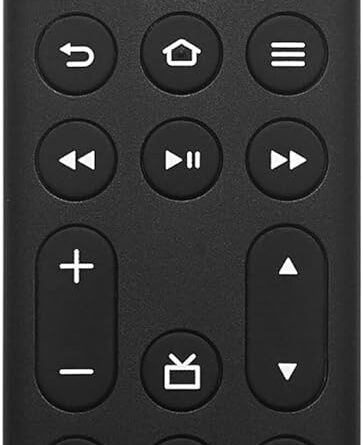
Beyond voice, the remote includes physical buttons for power, volume, navigation, and quick app shortcuts, letting you jump to popular services quickly. You’ll appreciate how fast you can launch a favorite streaming app without navigating multiple menus.
Connectivity and ports
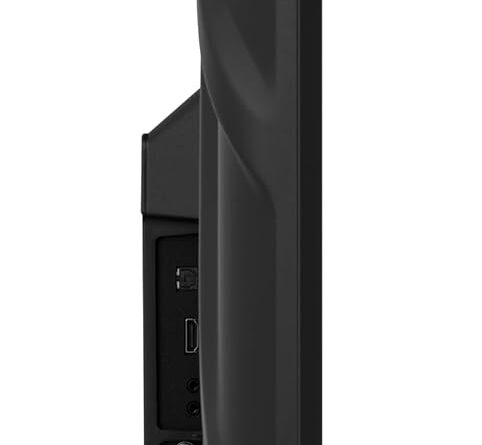
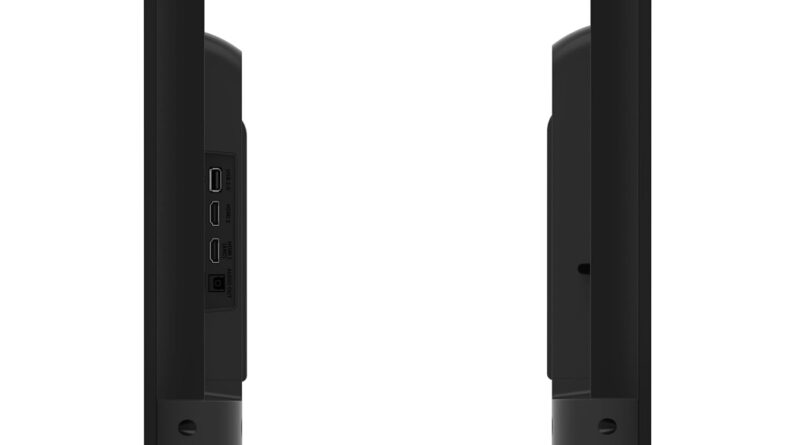
The TV includes two standard HDMI inputs and one HDMI ARC input for audio devices, so you’ll be able to attach a game console, streaming device, or Blu-ray player while also connecting a soundbar. That level of connectivity covers most typical setups without requiring extra adapters.
Wireless and casting
Bluetooth support lets you pair headphones or game controllers for private listening and better game control, while the Fire TV ecosystem supports casting and content sync across Fire devices. You’ll like how your watchlist and preferences can follow you from room to room when you have multiple Fire TVs.
TV inputs and expandability
With two HDMI ports, an HDMI ARC port, and wireless options you can expand your setup over time and still keep things simple. If you want to connect multiple consoles or a media player, you can do so without constant cable swapping.

Gaming and performance
If you play casual games or use cloud gaming services like Amazon Luna, the Fire TV 2-Series handles streaming games and Appstore titles well for casual play. For competitive or high-frame-rate gaming you’ll see limits compared to dedicated gaming displays, but for family gaming and streaming titles it’s suitable.
Cloud gaming and the Appstore
You can download games from the Appstore, stream via Luna, or watch broadcasts on Twitch, giving you a mix of casual and streaming-based gaming options. The platform is particularly useful if you like the convenience of gaming without a console or if you want to try cloud gaming as a supplement to other systems.
Controller support and latency
Bluetooth controller pairing works for many games, although you’ll experience slightly higher input latency than a high-end gaming monitor or TV designed for esports. If you want competitive responsiveness for fast-action FPS or fighting games, consider a gaming-focused display; for casual play and family-friendly titles, the Fire TV performs well.
Setup and day-to-day use
Setting up the TV is straightforward, and the guided Fire TV setup walks you through connecting to Wi-Fi, signing into your Amazon account, and installing apps. You’ll be able to get up and running in a few minutes and start streaming content without a steep learning curve.
Account linkage and privacy
You’ll sign in with your Amazon account to access Prime Video and personalized features, and you can adjust privacy settings and data preferences during setup. If privacy is a major concern, you can review and customize voice history and data-sharing options in the Fire TV settings.
Multi-room syncing and continuity
One useful feature is sync: your watchlists, apps, and progress often follow you if you use multiple Fire TV devices, which is handy if you watch in different rooms. You’ll appreciate not having to hunt for where you left off when switching from a bedroom TV to a living-room screen.
Real-world streaming experience
Streaming full episodes and movies is smooth, and the Fire TV UI keeps recommendations and trending content front and center so you can find something to watch quickly. You’ll notice the TV handles popular streaming services gracefully, and the HDR support gives compatible shows a noticeable improvement over non-HDR content.
Free streaming options
You’ll have a lot of free content available through apps like YouTube, Tubi, and Pluto TV, which means you can watch without a subscription if you’re on a budget. These free apps expand your viewing choices and are great for casual viewing or background TV.
Subscription services and app performance
Apps like Netflix, Disney+, and Prime Video run well and maintain picture quality, with app performance comparable to other smart TVs in the same category. You’ll get the content you expect from major services without frequent stuttering or long load times.
Power consumption and energy considerations
This model is engineered to be efficient for a 40-inch HDTV, which helps keep electricity usage manageable if you use the TV for several hours daily. You can also use the TV’s settings to reduce power consumption, such as dimming the screen or setting automatic power-off timers.
Settings to save power
You’ll find picture and power settings that reduce brightness or set idle time limits, which are useful if you’re conscious about energy costs. Adjusting these options will slightly impact picture brightness, but they’re effective for lowering daily energy use without major concessions to viewing quality.
Who this TV is best for
If you want an affordable smart TV that brings Amazon’s Fire TV ecosystem to a 40-inch, 1080p display, this model is a great match for bedrooms, guest rooms, dorms, and as a second living-room screen. You’ll enjoy fast access to streaming apps, Alexa voice control, and straightforward connectivity without paying premium 4K prices.
Not ideal for every use case
If you demand 4K resolution, advanced HDR performance, or high refresh rates for competitive gaming, you’ll find better options in higher-priced models. For primary home theater setups or rooms with extreme ambient light, consider stepping up to a higher-tier display for improved brightness and color range.
Pros and cons
You’ll want a clear snapshot of strengths and weaknesses when making your buying decision; this section distills the main advantages and trade-offs. Consider how each pro and con aligns with how you plan to use the TV.
Pros
- Familiar Fire TV interface with Alexa voice remote makes navigation and search effortless.
- 1080p resolution with HDR10/HLG support offers good picture quality for the price.
- Dolby Digital Audio and HDMI ARC provide straightforward options for improving sound.
- Bluetooth private listening is convenient for late-night viewing.
- Wide app support including free streaming apps lets you watch without subscribing to every service.
Cons
- Not a 4K TV, so you won’t get the higher detail and future-proofing of 4K sets.
- Build materials are basic and designed to cut cost rather than impress with premium finishes.
- Brightness and contrast won’t match higher-end TVs in very bright rooms.
- Gaming latency is higher than on dedicated gaming displays, which may affect competitive players.
Comparison to similar TVs
When you compare this Amazon Fire TV 2-Series to other budget 40-inch smart TVs, its tight integration with Fire TV and Alexa stands out. You’ll often get the same streaming apps on rival platforms, but the Fire OS experience may sway you if you already use Amazon services.
How it stacks up vs. 4K alternatives
4K TVs offer a sharper picture and better HDR highlights, but they cost more and often require more bandwidth to stream high-quality content. If you prioritize crisp detail for a primary living-room TV, going 4K is worthwhile; if you want a smart, capable secondary TV, the Fire TV 40″ 2-Series is a practical choice.
Ecosystem advantages
If you’ve invested in Echo speakers, a Prime subscription, or other Amazon devices, you’ll find that the Fire TV experience improves convenience through cross-device control and synced content. You’ll get extra utility from the TV simply by tying it into an existing Alexa-powered household.
Price and value
This TV is priced to compete in the budget segment while delivering strong smart features that add value beyond its hardware. You’ll get a compelling combination of streaming access, voice control, and balanced picture quality for a relatively modest outlay.
Long-term ownership and updates
Because Amazon provides ongoing software updates and adds features over time, the TV can remain useful longer than a set that lacks smart updates. You’ll benefit from added Alexa skills, new app integrations, and occasional performance improvements without needing a hardware upgrade.
Practical tips before you buy
Think about where you’ll place the TV, whether you want a soundbar, and how much streaming bandwidth you have available to get the best experience. You’ll also want to check for seasonal sales and bundle deals that can make the purchase even more economical.
Setup recommendations
During setup, ensure you connect the HDMI ARC if you plan to use a soundbar, pair Bluetooth headphones for private listening, and sign into the services you use most to get personalized recommendations. You’ll also want to tweak picture presets (like movie or standard) to match your room lighting for the best picture.
Final thoughts
If you want an approachable, affordable TV that places Fire TV and Alexa at the center of your viewing experience, the “Amazon Fire TV 40″ 2-Series, HD smart TV with Fire TV Alexa Voice Remote, stream live TV without cable” is a practical pick. You’ll get straightforward streaming, voice control, and enough picture and audio quality for everyday enjoyment without overspending.
Should you buy it?
Buy this TV if you want a smart, budget-friendly 40-inch set that integrates with Amazon services and provides solid performance for casual viewing and streaming. Consider other options if you need 4K resolution, top-tier HDR, or competitive gaming performance; otherwise, this TV offers strong value for most users.
Disclosure: As an Amazon Associate, I earn from qualifying purchases.