


Are you considering the VIZIO 24-inch D-Series Full HD 1080p Smart TV with Apple AirPlay and Chromecast Built-in, Alexa Compatibility, D24f-J09, 2022 Model for a bedroom, dorm room, kitchen, or compact living space?

Quick Verdict
You get a compact, affordable 24-inch 1080p TV that balances picture quality, smart features, and basic gaming support in a small package. If you want a secondary TV or something for tight spaces, this model gives surprisingly good value without a lot of extra complexity.
Product Overview
The VIZIO 24-inch D-Series Full HD 1080p Smart TV with Apple AirPlay and Chromecast Built-in, Alexa Compatibility, D24f-J09, 2022 Model is VIZIO’s small-screen offering that brings Full HD resolution to rooms where a larger set would be overkill. It combines a full-array LED backlight and an IQ Picture Processor with SmartCast, so you get a better-than-basic image and native access to popular streaming apps and casting technologies.
Key Features
This TV offers 1080p Full HD resolution, a Full Array LED backlight for more even brightness, and the IQ Picture Processor for smoother scaling and quicker navigation. You also get SmartCast with major streaming apps, Apple AirPlay and Chromecast built-in for casting from phones and laptops, and Alexa compatibility for voice control through an external Alexa device.
What’s in the Box
You’ll find the TV panel, a simple stand that screws into the bottom, a basic remote, and quick-start guides in the box. Cables (HDMI, power extension) are not guaranteed in every retail package, so you should check the listing or retailer before purchase.


Design and Build Quality
VIZIO designed the D24f-J09 to be lightweight and space-conscious, so it fits easily on desks, counters, and compact TV stands. The build feels solid for the price point, with a plastic chassis that is functional rather than luxurious.
Physical Design
The bezels are reasonably slim on the sides and top, with a slightly thicker chin area that houses the VIZIO logo and IR receiver. You’ll find the buttons (power and basic controls) located on the back or side in most units, which keeps the front clean but makes physical access a bit awkward when the set is wall-mounted.
Stand and Mounting
The included stand supports the TV well and keeps it steady on a flat surface, though it occupies more width than ultra-slim metal stands used on more expensive TVs. If you prefer wall mounting, the TV supports VESA mounts (measurements vary by unit) so you can attach a compatible bracket for a neater, elevated install.
Display and Picture Quality
For a 24-inch panel, the 1080p resolution delivers crisp text and images, especially when sitting at typical viewing distances for small rooms. The Full Array LED backlight improves uniformity compared to edge-lit sets, which helps reduce brighter-edge artifacts and improves perceived contrast.
Resolution and Scaling
1080p Full HD on a 24-inch screen gives you a dense pixel matrix that makes fine detail and small on-screen text easy to read. The IQ Picture Processor helps scale lower-resolution content with fewer artifacts, so streaming 720p or SD content looks smoother than it might on cheaper small TVs.
Full Array LED Backlight & IQ Picture Processor
The Full Array LED backlight provides better light uniformity, so you’ll notice fewer brightness inconsistencies across the screen during mixed scenes. The IQ Picture Processor handles color mapping, noise reduction, and motion interpolation, which makes menus and app navigation feel snappy and keeps most streaming content looking clean.
Color, Contrast and Uniformity
Colors tend to be vibrant without being oversaturated, which makes streaming shows and animated content pop. Blacks won’t match those from OLED or high-end local-dimming sets, but the Full Array backlight gives respectable contrast for a budget LED TV and avoids harsh haloing typical of edge-lit LEDs.
Motion Handling and Refresh Rate
This model is designed with a standard refresh rate suitable for TV content and casual gaming. Motion handling is improved by VIZIO’s processing, which reduces judder in pans and camera moves, though you may notice blurring in very fast sports or action scenes compared with higher-refresh panels.

Audio Performance
You’ll get dual 9W speakers (9 watts x 2) that are tuned for clear dialogue and reasonable mid-range. The TV’s sound is fine for everyday viewing, but you might find it lacking when you want cinematic depth or deep bass.
Speakers and Output
With 9W per channel, the speakers deliver adequate volume for small rooms and clear vocals for news, talk shows, and streaming content. The physical speaker placement and small driver size limit low-frequency performance, so bass-heavy tracks won’t have much impact.
Sound Quality in Real Use
Dialog comes through cleanly, so you won’t constantly need subtitles to follow shows. However, for movies and music you’ll notice thinness and limited soundstage; the TV is best paired with a soundbar or external speakers if you crave fuller sound.
Audio Enhancements and Limitations
VIZIO includes basic audio processing settings to optimize voice clarity and balance, which helps in everyday use. There’s no built-in Dolby Atmos height simulation or powerful DSP suite on this model, so plan on an external audio device for immersive experiences.
Smart TV Platform: SmartCast
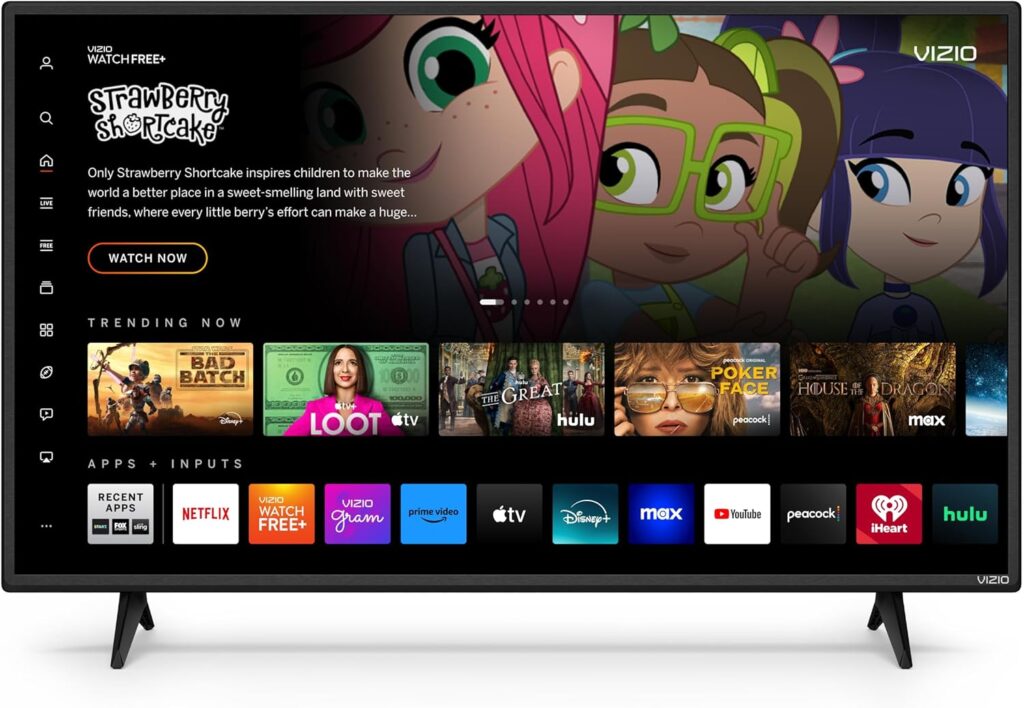
SmartCast gives you a straightforward, app-centric smart TV experience with quick access to the most-used streaming services. Navigation is intuitive and the interface is uncluttered, so you can launch apps or cast content without configuration headaches.
App Availability and Interface
You’ll find major streaming apps like Netflix, Disney+, YouTube, and HBO Max available out of the box, which covers most viewing needs. The interface presents apps in a row and uses your sign-ins for personalization where supported, though availability can vary slightly by region.
Voice Assistants and Casting
Apple AirPlay and Chromecast are both built into the TV, allowing you to cast or mirror from iPhones, Android phones, and laptops with ease. Alexa compatibility is supported, meaning you can control power, input switching, and volume through a linked Alexa device, or use voice commands via SmartCast when available.
Gaming Performance
The V-Gaming Engine and a focus on lower input lag make this TV surprisingly friendly to console gaming, especially for next-gen consoles that benefit from variable refresh and faster response. On a 24-inch screen, you’ll enjoy responsive play in titles where speed matters, and the localized gaming menu gives quick access to performance tweaks.
V-Gaming Engine and Features
VIZIO’s V-Gaming Engine auto-optimizes picture mode for gaming and provides support for Auto Game Mode and Variable Refresh Rate (VRR) with AMD FreeSync. These features reduce tearing and stutter, giving a smoother experience on compatible consoles and PCs.
Input Lag and Responsiveness
This D-Series model has one of the lower input lag figures in VIZIO’s D-Series line, which means button presses register quickly on-screen. That responsiveness is a big plus for fast-paced shooters, platformers, and competitive games where a few milliseconds can matter.
For Casual vs Serious Gamers
If you’re a casual gamer or play on consoles in a small room, the experience will be more than acceptable and often enjoyable. Serious competitive players or those wanting the lowest possible lag and advanced gaming features (like high refresh rates above 120Hz or hardware motion smoothing) may prefer higher-end displays.
Connectivity and Ports
The TV provides a useful combination of wired and wireless connections to match most users’ needs. You’ll have essentials like HDMI inputs and at least one USB port, as well as modern wireless options for streaming and casting.
Wireless and Bluetooth
Built-in Wi-Fi allows you to stream directly and use SmartCast apps without needing external dongles. Chromecast and Apple AirPlay let you cast media from your devices, but Bluetooth may be limited depending on the firmware version — check if you need wireless headphone support or other Bluetooth peripherals.
HDMI, USB and Other Ports
Expect multiple HDMI ports for connecting a console, streaming box, or Blu-ray player, and at least one USB port for media playback or firmware updates. There’s likely a digital audio output or headphone jack on the set for connecting soundbars or external systems, making it easy to upgrade audio without complex setups.
Specifications at a Glance
| Specification | Details |
|---|---|
| Model | VIZIO 24-inch D-Series D24f-J09 (2022) |
| Screen Size | 24 inches |
| Resolution | 1080p Full HD (1920 x 1080) |
| Aspect Ratio | 16:9 |
| Backlight | Full Array LED |
| Processor | IQ Picture Processor |
| Speakers | 9W x 2 |
| Smart Platform | SmartCast |
| Casting | Apple AirPlay, Chromecast built-in |
| Voice | Alexa compatibility |
| Gaming Features | V-Gaming Engine, Auto Game Mode, VRR with AMD FreeSync |
| Ports | HDMI (multiple), USB, digital audio out / headphone jack (varies) |
| Standby Power | d> |
| Year | 2022 |
This table gives you a compact view of the most important specs so you can quickly compare against other options. Check the full retail listing for exact port counts and VESA mount measurements before you buy.
Setup and Ease of Use
Setting the TV up is straightforward and aimed at non-technical users, with on-screen prompts guiding you through Wi-Fi, app sign-in, and basic calibration. If you’ve used other SmartCast devices, the flow will feel familiar and fast.
Remote and Controls
The included remote is simple, with shortcuts for major streaming services and minimal buttons for navigation. If you prefer voice control, linking with Alexa or using an Apple device with AirPlay will make hands-free operation easier.
Initial Setup Experience
Connecting to Wi-Fi and logging into apps takes just a few minutes if you have account credentials handy. The on-screen setup may push some software updates, so plan a bit of extra time the first time you power the unit on.

Energy Use and Environmental Considerations
The TV has a standby power rating under 0.5W, which keeps energy draw minimal when the set is off. LED panels tend to be more efficient than older LCD types, so for a small screen like this your electricity impact will be modest.
Pros and Cons
You’ll appreciate how much functionality VIZIO squeezed into a compact, affordable package — crisp 1080p resolution, SmartCast, and gaming-friendly features stand out. On the flip side, audio limitations and the lack of advanced picture tech (like HDR10+ or premium local dimming) are things to keep in mind if you’re focused on cinematic performance or high-end audio.
Pros
- Compact 24-inch 1080p screen ideal for small spaces and desk setups.
- Full Array LED and IQ Picture Processor for improved uniformity and processing.
- SmartCast with Apple AirPlay and Chromecast built-in plus Alexa compatibility.
- V-Gaming Engine, VRR with FreeSync, and low input lag for gaming.
Cons
- Speakers are limited in bass and overall dynamics, so external audio is recommended.
- Not suitable as a main living-room centerpiece if you want premium HDR or cinematic depth.
- Port layout and physical controls can be awkward if you plan to wall-mount and access them often.
Who Should Buy This TV?
If you need an affordable, capable 24-inch TV for a bedroom, dorm, kitchen, or small office, this model is a strong contender. It’s particularly good for someone who values crisp Full HD picture, easy casting from devices, and decent casual gaming performance on a small screen.
Alternatives to Consider
Consider slightly larger or higher-tier VIZIO models if you want better HDR performance, a wider color gamut, or enhanced audio. Other brands like TCL and Hisense also offer compact 24–32 inch models with similar Smart TV features and different price points, so compare ports, app ecosystems, and gaming features.
Troubleshooting and Tips
If you have Wi-Fi or app login problems, a router reboot and ensuring the TV has the latest firmware usually solve most issues. For image tweaks, try adjusting backlight, contrast, and the preset picture mode; gaming and movie modes usually present a sensible starting point.
Common Fixes
- No sound: Check internal volume, external audio outputs, and mute states; try a different HDMI cable if device audio is missing.
- Apps crashing or slow navigation: Ensure firmware is up to date and close background apps or reboot the TV.
- Poor Wi-Fi: Move your router closer or use a wired connection if possible; reduce network congestion by pausing heavy downloads elsewhere on the network.
Maintenance and Care
Keep the screen clean with a soft, microfiber cloth and avoid spraying liquids directly on the screen — spray the cloth lightly if needed. Periodically check for firmware updates through the SmartCast settings to keep security and performance optimized.
Accessories Worth Buying
A compact soundbar is the top accessory if you want better audio without breaking the bank, and a VESA-compatible wall mount will free up desk or counter space. A short, high-speed HDMI cable is useful for connecting game consoles or streaming boxes while keeping cables tidy.
Final Recommendation
If your priority is a compact, affordable TV that delivers respectable Full HD picture quality, native casting options, and gamer-friendly features in a small form factor, the VIZIO 24-inch D-Series Full HD 1080p Smart TV with Apple AirPlay and Chromecast Built-in, Alexa Compatibility, D24f-J09, 2022 Model is a solid choice. For the price and size, it hits the key marks for convenience, smart features, and everyday performance — just plan on adding external audio if you want fuller sound for movies and music.
FAQs
- Will this TV work well in bright rooms? You’ll get reasonable brightness and a Full Array backlight, but strong direct sunlight can wash out the image the same as with most LED TVs. Consider placement to reduce glare for the best results.
- Can you mount a soundbar under this TV? Yes, many compact soundbars can be placed on the same shelf or wall-mounted below the TV; check dimensions to ensure a clean fit.
- Is it easy to update apps and firmware? Yes, SmartCast handles updates through network downloads; allow a few minutes during initial setup for updates to download and install.
If you want, you can tell me what you primarily plan to use the TV for (gaming, streaming, desktop monitor, or kitchen use) and I’ll give tailored setup tips and accessory recommendations to match your needs.
Disclosure: As an Amazon Associate, I earn from qualifying purchases.


